
Home / Documentation / Accessory manual
Download the original PDF (199 kB)
This page reproduces the text of the PDF above without alteration, so the document can be read, searched and linked to directly.
Buttons and Indicator
Running Indicator Light = Illuminates solid green when the Period Clock is running. Note: this LED may not function consistently when the device is attached to an older Control Console.
Run = Start the Period Clock.
Stop = Stop the Period Clock.
Power and Connections
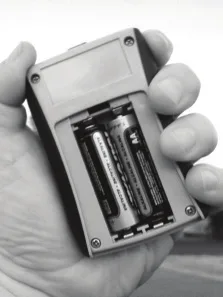
Electro-Mech Wired Handheld Switch Assemblies share the same basic design with our Wireless models. This design includes a battery compartment on the back of the Switch Assembly to facilitate remote operation of wireless units. Wired units do not require batteries, as power is supplied from the console through the wire. Do not install batteries in wired Switch Assemblies. Batteries serve no purpose, but may leak and corrode.
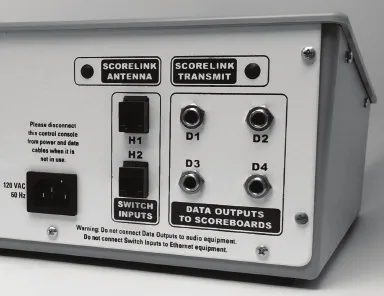
Electro-Mech Wired Handheld Switch Assemblies ship with a Cat5 Ethernet cord, commonly used with networks or personal computers. In this case, the Cat5 cord serves only to connect a wired Switch Assembly to your Control Console. Do not attempt to connect either the Switch Assembly or the Control Console to a network or PC using this cord or the RJ-45 sockets.
Connect the Switch Assembly to the back of the Control Console using either of the “H” labeled Switch Inputs. Note: Older back plates specify a particular handheld unit for each input. However, the older inputs are also interchangeable.
Page 1 of 1
Electro-Mech Engineering / 2016-Nov-02