
Home / Documentation / Accessory manual
Download the original PDF (350 kB)
This page reproduces the text of the PDF above without alteration, so the document can be read, searched and linked to directly.
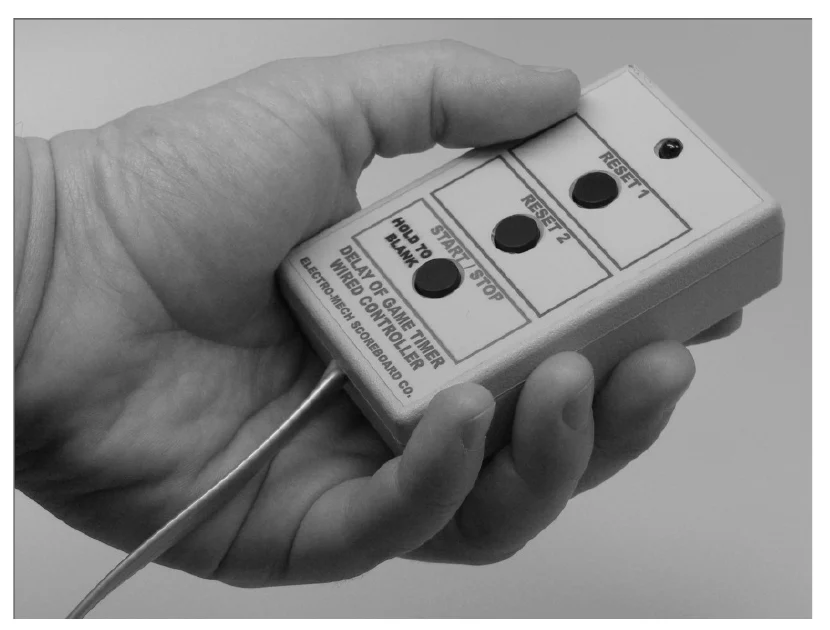
If you purchased a set of Play Clocks (also called Delay of Game Timers or 25-Second Clocks), your package includes a handheld three-button controller. This controller plugs into the back of the control console using the RJ-45 style connector at the end of the handheld unit's cable. You may plug into either of the two console sockets labeled "SWITCH INPUTS" on current models, or either the "CLOCK Hand-held" or "DGT/SC Hand-held" socket on older models. Here's what the buttons do:
Top Button = Set the Play Clock to Reset 1 value (default = 40 seconds).
Middle Button = Set the Play Clock to Reset 2 value (default = 25 seconds).
Bottom Button = Start / Stop the Play Clock.
If you press and hold the bottom button for two to three seconds, the Play Clocks will blank. Then pressing any of the three buttons turns the displays back on.
Using the [PLAY CLOCKS] button on the main control console, you may assign any number, from 1 to 99 seconds, to Reset 1 and Reset 2. Unlike most other settings, these reset values are "sticky" through a [NEW GAME] [1] clearing of the game data.
Revised 2014-July-09