
Home / Documentation / Accessory manual
Download the original PDF (740 kB)
This page reproduces the text of the PDF above without alteration, so the document can be read, searched and linked to directly.
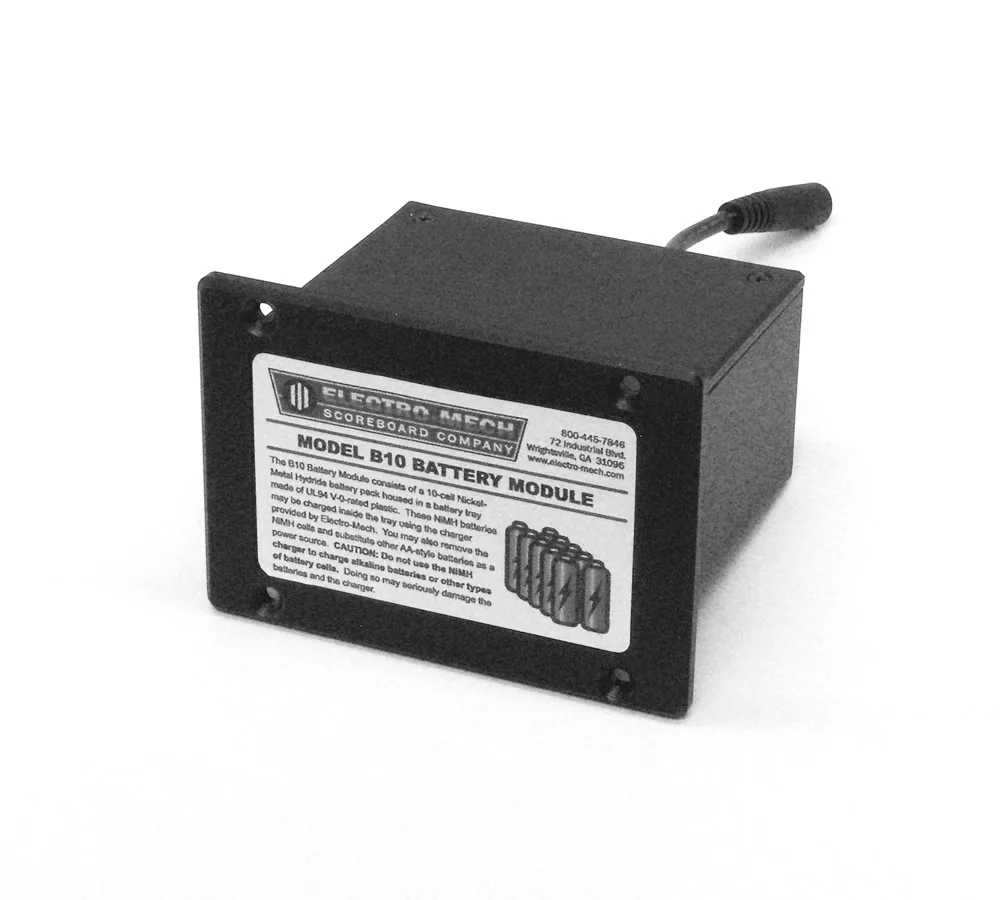
The purpose of this manual is to explain how to use and maintain the Electro-Mech Model B10 NiMH Battery Module Rechargeable Battery Pack.
GENERAL DESCRIPTION
- Your scoreboard control console includes the B10 NiMH Battery Module. This battery module, when fully charged, provides over 12 hours of continuous power to the control console. When paired with the ScoreLink RF communication system, the B10 Battery Module gives you freedom to operate your scoreboard from almost anywhere within your facility, as long as you have a clear line of sight to the scoreboard display.
NORMAL USE
- When the battery module is charged and installed in the control console, use the three-position power switch on the back of the console to select battery power by clicking the switch up to the "BATTERY POWER" position.
- In the middle "OFF" position, the console's internal electronics are disconnected from power and do not drain the battery pack (although, like all batteries, the B10 Battery Module will continue to slowly discharge over time).
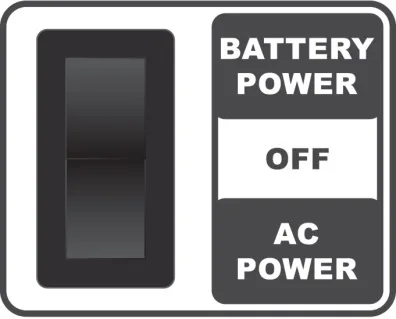
- In the down "AC POWER" position, the console receives power through the AC power socket just below the switch. Use the detachable power cord provided with your console, attaching the male end of the cord to a standard 120 VAC power receptacle. If your power cord is lost or damaged, you may substitute a typical C-13-style power cord ─ the type used with many desktop computers ─ to connect the control console to AC power.
- Please note that the B10 Battery Module DOES NOT CHARGE inside the control console when you plug up the AC power cord. You must remove the battery pack from the console and attach it to the Smart Charger in order to recharge the battery cells. The AC power option is simply a backup power source to allow you to operate the console without a charged battery pack.
CHARGING THE BATTERY MODULE
- When you are ready to charge the B10 Battery Module, you must remove it from the control console.
- First, set the power switch on the back of the console into the middle "OFF" position.
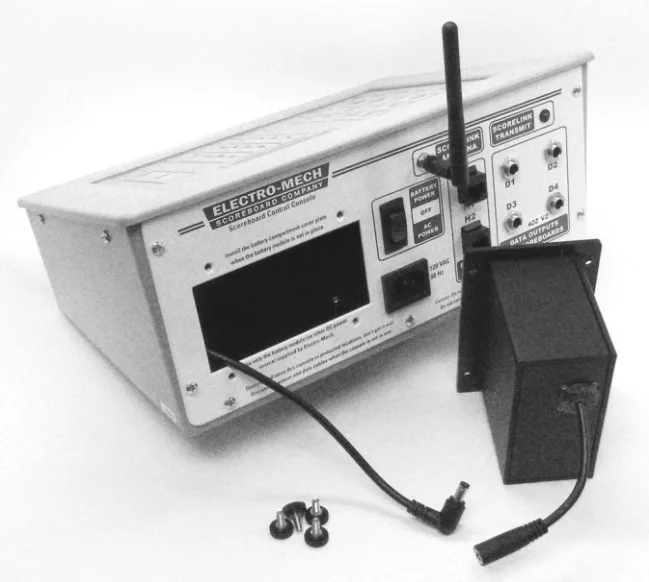
- Next, take out the four thumbscrews. Slide the battery module out of the console body and disconnect the DC coupling in the back of the battery pack.
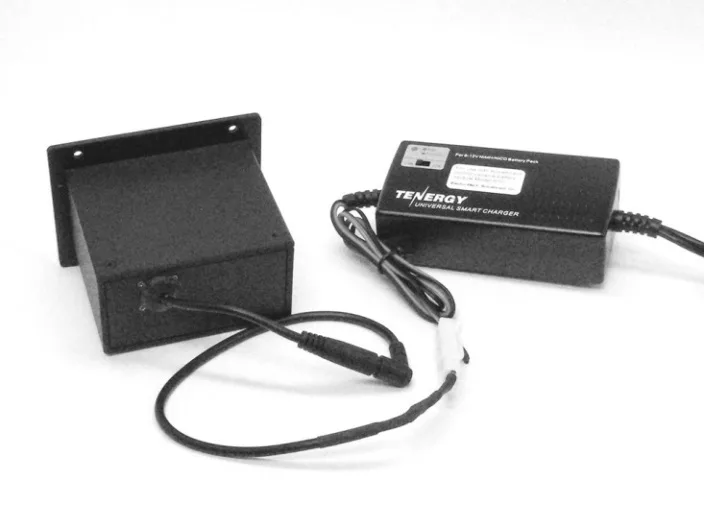
- The Universal Smart Charger provided with your battery system can be used to recharge several types of batteries. For this reason, it ships with detachable clip- style connectors as well as the barrel-style connector used on the B10 Battery Module. If it is not already attached to the charger's output cable, connect the barrel-style cable assembly to the charger.
- Plug the charger's AC power cord into a standard power receptacle. Plug the barrel-style connector onto the coupler attached to the B10 Battery Module. It is not necessary to use the charger's temperature probe when charging the B10 module. The charger's LED will illuminate red during the charge cycle and will turn green when the cycle is complete.
RETURNING THE CHARGED MODULE TO THE CONTROL CONSOLE
- When you have finished charging the battery module, disconnect the charger cables ─ both the AC power cable that powers the charger and the DC cable that connects to the battery pack.
- Make sure the power switch on the control console remains in the middle "OFF" position.
- Plug the battery module into the DC coupling that extends from inside the control console.
- Tucking the cables behind the battery pack, push the enclosure into the body of the control console. Check for pinches and snags in the cables as you slide the module back into place.
- Reattach the four thumbscrews that secure the battery module into the console.
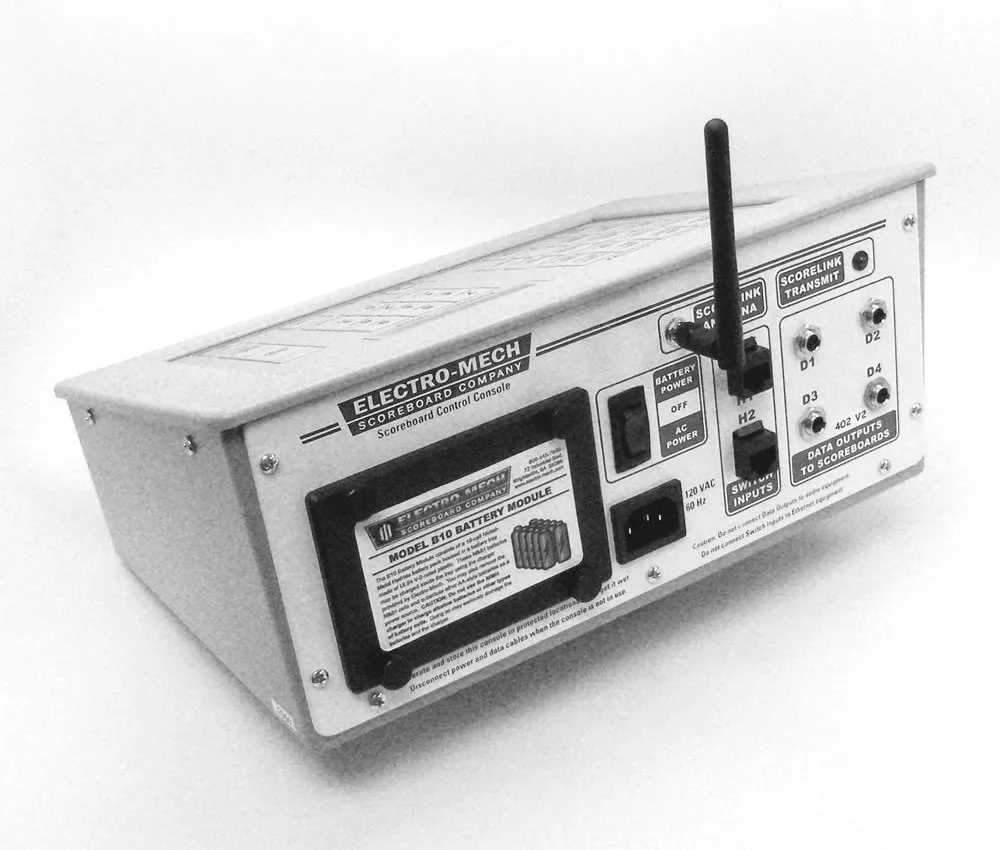
- When you are ready to use the control console, click the power switch up into the "BATTERY POWER" position.
CHARGE TIME AND RUN TIME
| • In most cases, the Smart Charger will completely charge the B10 Battery Module | ||
| within two hours. This should give you enough power to run your scoreboard for | ||
| at least 12 hours. You might run two or three shorter games over the course of a | ||
| weekend without needing a charge. | ||
| • If you plan to wait several days between uses | ─ even short uses ─ we | |
| recommend scheduling a full charge cycle on the day of, or the day before, an | ||
| upcoming game. Any battery will lose power over time, whether it is connected | ||
| to something or not. With this in mind, you cannot expect a full 12 hours of use | ||
| from the battery module if you spread those hours over several days or more. | ||
| • In our testing, we have found 12 hours to be a conservative estimate of how long | ||
| an MP-style console with an embedded ScoreLink system will run before the | ||
| console detects a significant drop in voltage supplied by the battery pack. Under | ||
| ideal conditions, the MP console can run for over 16 hours and an MM console | ||
| can run for over 24 hours on freshly charged batteries. | ||
| • When the voltage supplied by the battery module drops to 11 VDC, the MP | ||
| console will display the following warning message: | ||
| BATTERY LOW | ||
| ─ PRESS ENTER ─ | ||
| • When this message appears, the battery pack will typically continue to provide | ||
| power for another hour. Once the voltage drops below 10 VDC, the hardware | ||
| quickly enters a state in which it can no longer support sending data. Though the | ||
| console is not usable at this point, it is still drawing power from the battery | ||
| module! It is important to set the power switch to the middle "OFF" position or | ||
| swap over to AC power to prevent the batteries from being damaged. | ||
| • As explained below, it is possible to replace the AA cells in the B10 Battery | ||
| Module with | non -rechargeable batteries or other AA cells. The cells supplied | |
| with the B10 module are rated at 1.2 VCD, 2400 mAh. Off-the-shelf alkaline AA | ||
| batteries (the non-rechargeable type) are typically rated at 1.5 VCD, 1200 mAh. | ||
| You can expect about a 25% reduction in run time if you switch to alkaline cells. | ||
| In other words, a fresh set of alkaline batteries will give you 8 hours of run time | ||
| before the "BATTERY LOW" message appears on your MP console, and another | ||
| 45 minutes of use after the message displays. |
REPLACING THE AA BATTERY CELLS
- In general, we recommend replacing the entire B10 Battery Module if one or more of its cells become damaged, or if performance begins to degrade. However, since you may not always have time to wait for a new module to be shipped to you, there is another option. It is possible to replace the ten AA cells with similar AA cells so that you won't be without battery power in an emergency.
- To open the B10 Battery Module, first power off the control console.
- Remove the battery pack from the console body, and unplug the DC coupling.
- Remove the two screws holding the cover plate on the battery module.
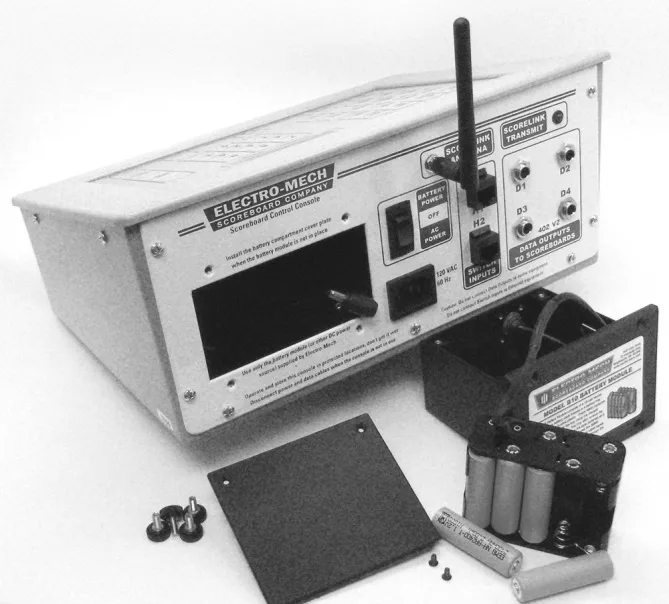
- Remove the battery holder and take out the ten nickel–metal hydride (NiMH) battery cells.
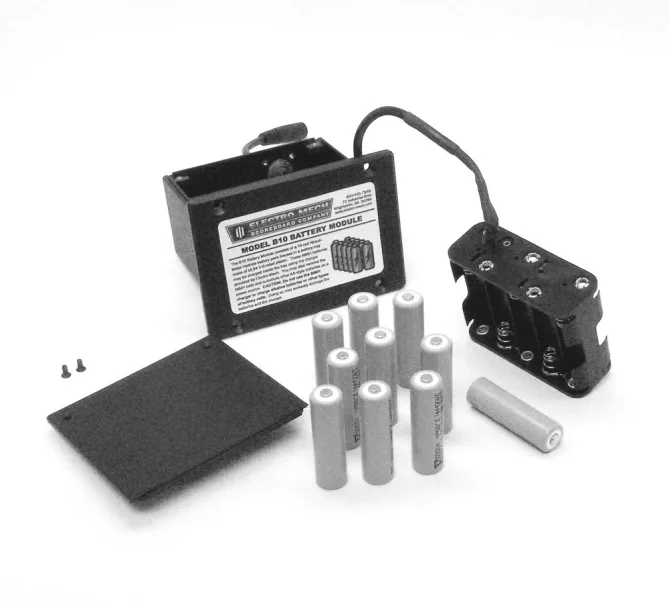
- Each cell in the B10 Battery Module is rated at 1.2 volts, 2400 mAh. You may substitute ten similarly rated rechargeable batteries. Or you may use ten non- rechargeable AA cells, such as 1.5 volt alkaline AA batteries. While we have not exhaustively tested every brand and formula, we can say that all of the AA batteries we've tried as substitutes have worked in the B10 Battery Module. There are three important caveats : 1. Do not mix batteries; use a set of ten matched cells. Mixing alkaline batteries with rechargeable batteries is a particularly bad choice. 2. Never attempt to charge non-rechargeable batteries. 3. The Smart Charger we provide is designed for specific types of batteries. If you are not certain that the cells you have are compatible with this charger, do not experiment.
- When you insert new AA cells in the battery holder, be careful to follow the markings for polarity. The flat end of the battery goes with the springy part of the holder. When you have replaced all ten cells, set the holder back into the battery pack, slip the cover in place, and put the two screws back in. You can expect up to eight hours of power from a typical set of alkaline AA cells with a full charge.
MAINTENANCE AND DISPOSAL
- The first rule for a healthy battery module is: Turn it off when you aren't using it. When the control console's power switch is in the middle "OFF" or down "AC POWER" positions, the battery pack is completely disconnected from the circuitry in the console. Keeping the switch in either of these positions is just as effective as removing the battery pack from the console completely. Even though no circuitry is actively draining the cells, they will always lose a little bit of power over time. But leaving the switch up in the "BATTERY POWER" position will actively drain the battery pack and eventually damage the cells.
- If you store your console in a place where people might bother it, move it, bump things into it ─ in other words, if there is a possibility that the power switch might accidentally get turned on ─ then you may want to take the extra precaution of removing the battery pack from the console. A better solution would be to purchase a hard carrying case to protect the console!
- The second rule is: If you go several days or more without using the scoreboard control console, then give the battery module some time on the charger within a day or two of your next game.
- The third rule is: Don't leave the battery module on the charger for longer than you have to. Although the Smart Charger is specifically designed to monitor and protect the battery cells, it is not a piece of heavy-duty equipment that is designed to stay powered up 24/7. We aren't worried about customers leaving the battery pack on the charger for a few hours past full charge. But we are
concerned that chargers might be left on and unattended for days or weeks at a time.
- As of this writing, NiMH batteries are not considered hazardous materials in the United States and require no special precautions for disposal ─ except in the state of California. However, NiMH cells can be recycled, and we encourage you to find a local facility that will accept them for that purpose. If you are unable to find a recycling center that will take the batteries, please return them to Electro- Mech.
SAFETY
- The B10 Battery Module has been tested to be in compliance with UL Standard 879 for Electric Sign Components. The enclosure is designed to withstand, chemical leakage, heat, and electrical discharges that could occur in damaged battery cells. The normal low voltage output is not considered to be dangerous. When used as intended, the system is safe.